
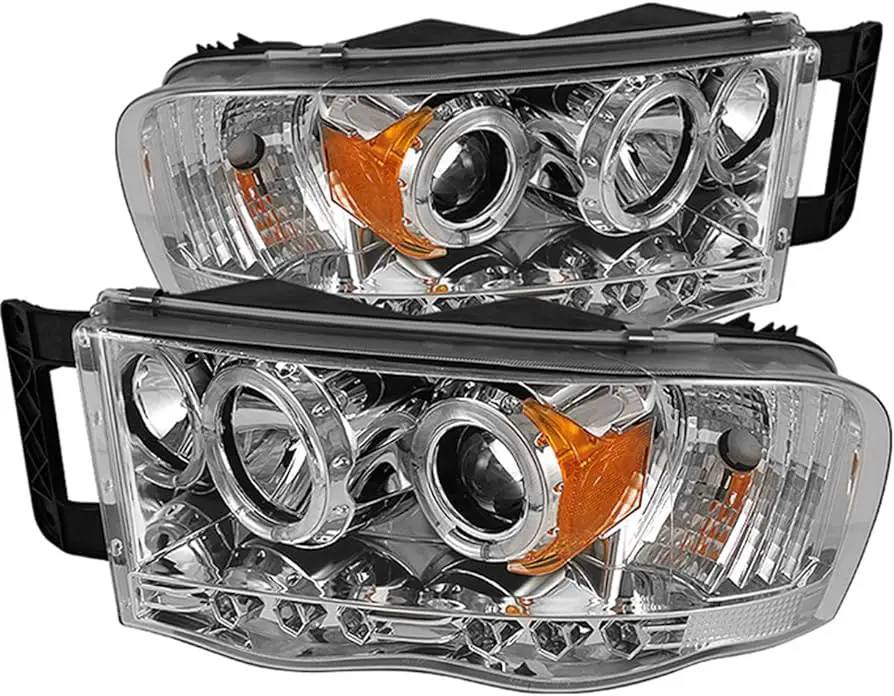
To maintain projector headlights, remove the projector from the headlight without modifications, clean the internal projector lens using a cotton swab or an APC followed by glass cleaner, ensure effective wiring harness ground for bright lights, and adjust the headlights’ angle if needed. It is crucial to wipe off dirt with soap or glass cleaner, dry thoroughly, and protect the headlights from feedback frequencies or contamination that may damage them.
Cleaning The Projector Headlights
Proper maintenance of projector headlights is essential to ensure optimal visibility while driving at night. One crucial aspect of maintenance is cleaning the headlights regularly. Over time, road debris, dust, and other contaminants can accumulate on the projector lens, causing reduced light output and diminished clarity. In this section, we will guide you through the step-by-step process of cleaning your projector headlights, along with the necessary tools and precautions to take.
Tools And Materials Needed For Cleaning
Before you begin, gather the following tools and materials:
- Soft microfiber cloth
- Soap or glass cleaner
- Water
- Cotton swabs
- Isopropyl alcohol
Step-by-step Guide To Cleaning The Headlights
Follow these steps to clean your projector headlights effectively:
- Start by rinsing the headlights with water to remove any loose dirt or grime.
- Dilute a small amount of soap or glass cleaner in water. Dip the microfiber cloth into the solution.
- Gently wipe the projector lens using the dampened cloth. Make sure to cover the entire surface to remove stubborn stains or residue.
- If there are hard-to-reach areas, such as crevices or corners, use a cotton swab dampened with isopropyl alcohol to clean them.
- After cleaning, rinse the headlights again with water to remove any leftover cleaning solution.
- Use a dry microfiber cloth to thoroughly dry the headlights, ensuring there are no streaks or watermarks left behind.
Precautions To Take During The Cleaning Process
While cleaning your projector headlights, it is important to take certain precautions to avoid any damage:
- Avoid using abrasive cleaners or rough materials that may scratch the lens surface.
- Do not apply excessive pressure when cleaning, as it may result in lens damage.
- Ensure that the headlights are completely cool before starting the cleaning process to prevent burns.
- If using isopropyl alcohol, test it on a small, inconspicuous area first to ensure compatibility with the lens material.
By following these steps and taking the necessary precautions, you can keep your projector headlights clean and clear, ensuring optimal visibility and a safer driving experience.

Credit: www.carid.com
Removing Projector From Headlight
Learn how to properly remove a projector from your headlight without any modifications. Check out YouTube tutorials or guides on cleaning the internal lens of your headlight for maintenance purposes.
In order to properly maintain your projector headlights, it is important to know how to remove the projector from the headlight. Whether you want to clean the internal lens or make modifications, understanding the process of removing the projector is essential. In this section, we will explore the reasons to remove the projector, a step-by-step process for removal without modification, and tips for a successful removal process.
Reasons To Remove The Projector From The Headlight
There are several reasons why you might need to remove the projector from your headlight. Some common reasons include:
- To clean the internal lens: Over time, dust and debris can accumulate on the internal lens of the projector, affecting the brightness and clarity of the light output. Removing the projector allows you to clean the lens and restore optimal performance.
- To make modifications: If you want to install aftermarket bulbs or accessories, you may need to remove the projector to access the necessary components.
- To replace or repair the projector: If the projector is damaged or malfunctioning, removing it is necessary for replacement or repair.
Step-by-step Process Of Removing The Projector Without Modification
If you need to remove the projector from your headlight without making any modifications, follow these simple steps:
- Start by disconnecting the negative terminal of your vehicle’s battery to prevent any electrical accidents during the removal process.
- Remove the headlight assembly from your vehicle according to the manufacturer’s instructions. This may involve removing screws or clips that hold the assembly in place.
- Inspect the back of the headlight assembly to locate the projector. It is typically a separate component attached to the reflector housing.
- Disconnect any electrical connectors or wiring harnesses connected to the projector. Take care to label or remember their positions for reinstallation.
- Remove any screws or mounting brackets that secure the projector to the reflector housing.
- Gently remove the projector from the headlight assembly, taking care not to damage any surrounding components.
- Once the projector is removed, you can proceed with any necessary maintenance or repairs. Make sure to handle the projector with clean hands or gloves to avoid introducing dirt or oils onto the lens.
Tips For A Successful Removal Process
If you want to ensure a successful removal process of the projector from your headlight, consider the following tips:
- Refer to your vehicle’s service manual or online resources specific to your make and model for detailed instructions on removing the headlight assembly.
- Take clear photographs or make notes during the disassembly process to help you when reassembling the components.
- Handle the projector with care to prevent any damage or scratches to the lens or other delicate parts.
- Organize and label all removed screws, brackets, and wiring connectors to easily reassemble the headlight assembly.
- Use a clean and soft microfiber cloth or specialized lens cleaning solution to clean the internal lens of the projector, following the manufacturer’s guidelines for proper cleaning techniques.
- Before reinstalling the projector, ensure that all connections are secure and that there are no visible signs of damage or wear.
Adjusting Projector Headlights
Looking to maintain your projector headlights? Check out tutorials on how to remove projectors without modifications, clean internal lenses, and adjust the angle of the headlights for optimal brightness. Keep your headlights in top condition for improved visibility on the road.
Importance Of Proper Headlight Alignment
Proper headlight alignment is crucial for optimal visibility and safety on the road. When projector headlights are not adequately adjusted, they can cause several issues, such as reduced visibility, blinding oncoming drivers, and a compromised field of vision. Additionally, misaligned headlights can lead to inefficient lighting distribution, reducing the effectiveness of the headlights and potentially affecting the driver’s ability to see obstacles or road signs in low-light conditions.
Step-by-step Guide On Adjusting Projector Headlights
- Start by parking your vehicle on level ground, preferably facing a wall or garage door.
- Measure the height from the center of each headlight to the ground and mark it for reference.
- Locate the adjustment screws on the back of the headlight assembly. These screws typically control the vertical and horizontal alignment of the headlights.
- Using a screwdriver or the appropriate tool, adjust the vertical alignment screw to ensure that the headlights are pointing straight ahead and not too high or too low.
- Adjust the horizontal alignment screw to align the headlights properly, ensuring that they are parallel with each other and not pointing in different directions.
- After making adjustments, test the alignment by turning on the headlights and observing the light projection on the wall or garage door.
- Make additional adjustments as necessary until the light beams are aligned and provide optimal visibility without blinding oncoming drivers.
- Finally, compare the adjusted height of each headlight to the initial measurements taken earlier to ensure consistency.
Common Issues And Troubleshooting Tips
Even with proper alignment, projector headlights may encounter common issues that can affect their performance. Here are some troubleshooting tips to address these problems:
- If your projector headlights appear dim, check the wiring harness ground to ensure effective grounding, as poor grounding can result in reduced brightness.
- If you notice foggy or cloudy projector lens, consider cleaning the internal face of the lens using an APC (all-purpose cleaner) followed by a glass cleaner.
- In the case of stock projector headlights tilting, it is important to address this promptly as the feedback frequencies from misaligned bulbs can damage the headlights. Seek professional assistance to realign and secure the headlights properly.
- If the projector headlights continue to have dim lighting even after alignment, it might be necessary to inspect and replace the bulbs. Ensure the correct type, such as halogen, HID, or LED, is used for optimal brightness and performance.
Maintenance Tips For Projector Headlights
Proper maintenance is essential to ensure the optimal performance and longevity of your projector headlights. By implementing regular inspection, proper cleaning techniques, and choosing the right bulbs, you can keep your projector headlights in top shape. In this article, we will explore these maintenance tips in detail.
Regular Inspection For Any Damage Or Malfunction
To effectively maintain your projector headlights, it’s crucial to regularly inspect them for any signs of damage or malfunction. Conducting regular inspections can help you identify issues early on and prevent further damage. Here are a few important inspection points:
- Check the projector lens for any cracks, scratches, or fogging, as these can affect the light output and clarity.
- Inspect the wiring harness and connections for any loose or damaged wires that may hinder the electrical flow.
- Ensure the mounting brackets and screws are secure to prevent any misalignment or shaking.
Note: If you notice any significant damage or malfunction during the inspection, it is recommended to consult a professional for repair or replacement.
Proper Cleaning Techniques To Avoid Scratches
Cleaning your projector headlights is an essential part of maintenance, as it helps remove dirt, dust, and grime that can accumulate over time. However, it’s essential to use proper cleaning techniques to avoid scratching the delicate lens surface. Here’s a step-by-step guide:
- Start by rinsing the headlights with water to remove any loose dirt or debris.
- Use a mild soap or glass cleaner specifically designed for automotive use.
- Gently scrub the lens surface using a soft microfiber cloth or sponge, keeping in mind to avoid applying excessive pressure.
- Rinse the headlights again with clean water to remove any residue.
- Finally, dry the headlights using a soft, lint-free cloth.
Note: Avoid using abrasive materials, such as harsh chemicals, rough cloths, or paper towels, as they can scratch the lens surface and diminish the light output.
Choosing The Right Bulbs For Optimal Performance
Selecting the right bulbs for your projector headlights is vital for achieving optimal performance and visibility. Here are a few factors to consider:
- Ensure compatibility with your projector headlight system. Different projectors may require specific bulb types, such as halogen, HID, or LED.
- Consider the brightness and color temperature of the bulbs to achieve the desired level of illumination and aesthetics.
- Check for reputable brands that offer reliable and long-lasting bulbs.
Note: It is necessary to follow the manufacturer’s guidelines and specifications when choosing and installing bulbs to prevent any electrical or performance issues.
Frequently Asked Questions On Projector Headlight Maintenance
Do Projector Headlights Need Adjusting?
Yes, projector headlights may need adjusting.
Why Are My Projector Headlights So Dim?
Projector headlights may appear dim due to dirt or grime on the lens. Clean the headlights using soap, glass cleaner, or water to remove dirt. Ensure proper grounding of the wiring harness for brighter headlights.
Do I Need Special Bulbs For Projector Headlights?
No, special bulbs are not needed for projector headlights. They can use halogen, HID, and LED bulbs like other headlights. However, the bulbs in projector headlights can be brighter compared to reflector headlights.
How Do I Remove The Projector From A Headlight Without Modification?
To remove the projector from a headlight without modification, you can follow a step-by-step guide or watch online tutorials that demonstrate the process. It usually involves removing screws or clips to detach the projector from the headlight housing.
Conclusion
In order to keep your projector headlights in optimal condition, it is essential to perform regular maintenance. Start by wiping away any dirt or debris from the headlights using a soap or glass cleaner. Allow them to dry completely before applying a protective coating.
Additionally, ensure that the wiring harness ground is working effectively to prevent dim headlights. If necessary, adjust the angle of the headlights for maximum visibility. Remember, proper care and maintenance will ensure that your projector headlights remain bright and functional for a long time to come.